How to connect the scanner via Bluetooth
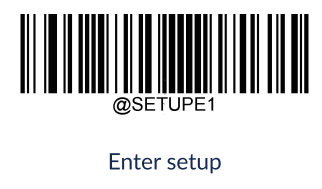
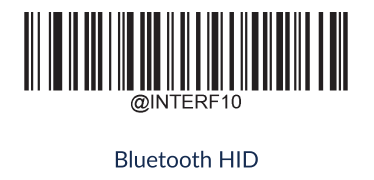
Start by scanning the 3 barcodes below in the order shown:
Enter Setup
Bluetooth HID
Exit Setup
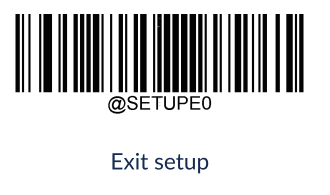
Once all 3 barcodes have been scanned, Bluetooth is enabled on the scanner.
Turn on Bluetooth on the computer or device you want to connect the scanner to.
Search for new Bluetooth devices.
Find the scanner in the list. It will typically be named:
HR2300-XXXXXXX or HR3300-XXXXXXX
The last 7 characters correspond to the last 7 characters of the scanner's serial number.
Select the scanner and press Connect.
When the connection is established successfully, the scanner beeps, and the white LED lights up.
The scanner is now connected via Bluetooth and ready to use.
